Simple Integration
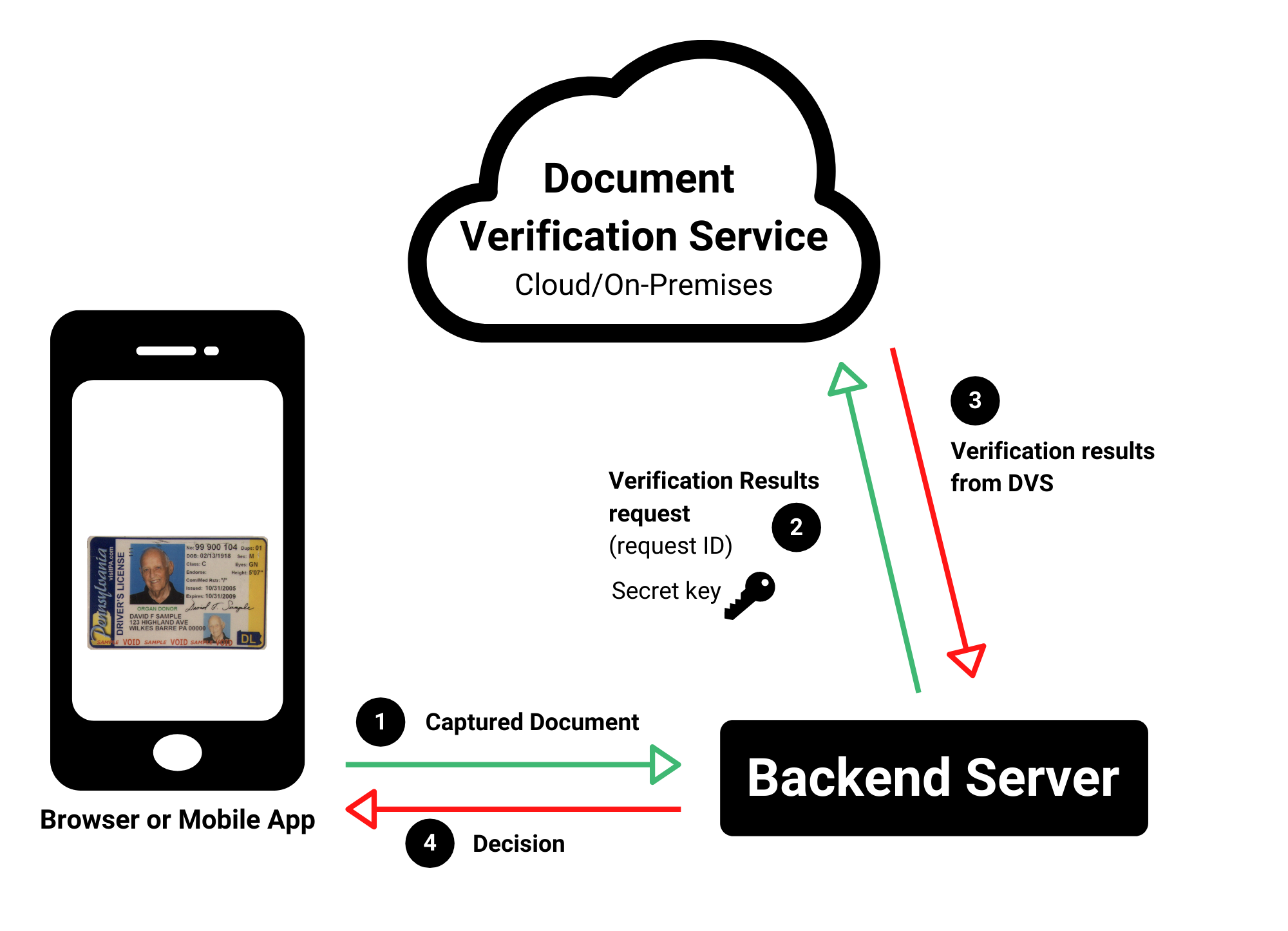
When building a DVS application following the simple integration design you will be responsible for building two applications
- Client Side Application
- Backend Server Application
Keys
The keys you were provided with will be used in the following way
| Application | Key |
|---|---|
| Backend Application | Secret Key |
Note
When your Backend Application is making requests to the DVS server for document verification it will be required to use the
secret key IDScan.net has provided you.
Web Library License Key
The License Key you were provided by IDScan.net will be used in your Client Side Application. This License Key is meant to be used on a single domain where the client side application is hosted.
| Application | Key |
|---|---|
| Client Side Application | License Key |
Note
During testing you can host your application at localhost with any License Key no matter what domain it is configured to be used with.
Implementation Steps
The client side application will collect the images of the document and then send them to your backend application
Using your Secret Key that was provided to you by
IDScan.netthe backend application will forward the images it received to the DVS Web APIThe backend application will then wait for a response from the DVS server, after DVS completes verification of the images trhe backend application will receive a Verification Response from DVS
This response will then be send back your client side application